2011. április 3., vasárnap

Scirra Construct (best 2d game creator)

Construct — the free open-source game creator

Make 2D games with Construct's visual, human-readable event system. No need to learn any programming or scripting languages at all. Fast, easy to learn, yet powerful for advanced users. Developed free by volunteers. Download now.

Game maker 8

Do you want to develop computer games without spending countless hours learning how to become a programmer? Then you've come to the right place. Game Maker allows you to make exciting computer games, without the need to write a single line of code. Making games with Game Maker is a lot of fun.
Using easy to learn drag-and-drop actions, you can create professional looking games within very little time. You can make games with backgrounds, animated graphics, music and sound effects, and even 3D games! And when you've become more experienced, there is a built-in programming language, which gives you the full flexibility of creating games with Game Maker. What is best, is the fact that Game Maker can be used free of charge.
You can do anything you want with the games you produce, you can even sell them! Also, if you register your copy of Game Maker, you can unlock extra functions, which extend the capabilities of the program. Game Maker comes preloaded with a collection of freeware images and sounds to get you started.

Now3D

Now3D is a freeware program for Windows platform written in Visual Basic 6.
Now3D (at the beginning called Planets) born in 1997 as application for the planets and stars visualization. Then, thanks to the first success in the 3D Graphic field, I have decided to leave the first idea to concentrating myself towards more difficult subjects.
My hope is that this program will be come for the most of yours a sprint to enter in the world of 3D Computer Graphics.

Giuliano Cornacchiola

Art of Illusion

Art of Illusion is a free, open source 3D modelling and rendering studio. Many of its capabilities rival those found in commercial programs. Highlights include subdivision surface based modelling tools, skeleton based animation, and a graphical language for designing procedural textures and materials..
The current version is 2.8.1, released Jan. 3, 2010. This version is both stable and powerful enough to be used for serious, high end animation work.
Click here to download the program.

Synfig Studio

Synfig Studio is a free and open-source 2D animation software, designed as powerful industrial-strength solution for creating film-quality animation using a vector and bitmap artwork. It eliminates the need to create animation frame-by frame, allowing you to produce 2D animation of a higher quality with fewer people and resources. Synfig Studio is available for Windows, Linux and MacOS X.

Scribus (Open Source Desktop Publishing)

Scribus is an Open Source program that brings professional page layout to Linux/UNIX, Mac OS X, OS/2 Warp 4/eComStation and Windows desktops with a combination of press-ready output and new approaches to page design. Underneath a modern and user-friendly interface, Scribus supports professional publishing features, such as color separations, CMYK and Spot Color support, ICC color management, and versatile PDF creation.


Karbon

Karbon is a vector drawing application with an user interface that is easy to use, highly customizable and extensible. That makes Karbon a great application for users starting to explore the world of vector graphics as well as for artists wanting to create breathtaking vector art.
Whether you want to create clipart, logos, illustrations or photorealistic vector images – look no further, Karbon is the tool for you!

Karbon is free software and is getting better every day. To increase the pace at which we are moving forward you are invited to contribute in the form of code, documentation, tutorials, document templates or user feedback. Join us on #koffice at irc.freenode.net, or on our mailinglist.

Alchemy

The Alchemy drawing canvas has an intentionally reduced level of functionality. No undo, no selecting, and no editing. Interaction focuses instead on the output of a great number of good, bad, strange and beautiful shapes.

IncrediMail (mail client)

  • Send beautiful email backgrounds
  • Add 1000's of fun emoticons to your emails
  • Enjoy animated email notifiers
  • See exciting 3D effects in your emails
  • Add funny animations to your emails
  • Add cool sounds to your email messages

Opera mail

Offline access

Access all your email even when you are not connected to the Web. Your emails are stored right on your hard disk so that you can read and respond anywhere. When you are back online, Opera Mail synchronizes with your web email service, keeping you organized and productive.

Low bandwidth mode

Designed for those who need to have access to email while traveling, which often means dealing with a slow Internet connection or sporadic connectivity. Enabling low-bandwidth mode makes Opera Mail fetch only the necessary information that you need to go through your emails. Read more

All accounts in one place

All the great features of Opera Mail work with all your different email accounts. To configure Opera Mail with your email service, see Create or add an account in the Opera Mail tutorial.

Smart spam filter

The smart spam filter that comes with Opera Mail not only works in the background to rid you of unwanted emails, but also learns from your preferences. Every time you drag and drop into, or out of, the spam filter, it learns more about your preferences and adjusts automatically.

Auto-sort

Emails from various mailing lists can be a nightmare to manage. Opera Mail automatically sorts these emails under the "Mailing Lists" view, making it easier to read and faster to organize them.

Opera Mail learns from you

Opera Mail incorporates smarter "views" and "labels" in place of traditional folders to organize your messages. Labels can also learn from the way you interact with them. Learn more.

Unread view

Say goodbye to the old-fashioned inbox. Opera Mail replaces it with a view that shows all your unread messages. This is a useful way of collecting all messages you have not read yet. Once you have read a message, mark it as read and it will disappear from view. It remains in the Received view for you to access later, and also in any other relevant views or labels. Think of your Unread view as an email "to do" list.

Search with speed

Searching through thousands of emails used to take time. With Opera Mail, you can quickly retrieve particular messages using the search field above the Mail toolbar. Also, if you search your messages regularly using the same query, click the Save Search button to save the search as a label. Learn more.

Follow or ignore threads and contacts

Designed to be simple and easy to use, following and ignoring threads and contacts lets you cut through the email clutter to respond to the people or subjects that are most important. Learn more.

Attachments label

The Attachments label in the Mail panel lets you browse through all emails in your inbox that have an attachment and sorts them according to type. Opera Mail does all the work for you when you are looking for different documents, pictures, or zipped archives in your mailbox.

Mozilla Thunderbird

Migration Assistant

Under the Help Menu, you can find the new Migration Assistant to help you set up Thunderbird the way you want it. If you liked the old toolbar from Thunderbird 2, you can quickly make that change with the Migration Assistant. You can also install add-ons from the Migration Assistant like Advanced Folder Columns and Compact Header for your message display window.

Mail Account Setup Wizard

Prior to this new feature you had to know your IMAP, SMTP, SSL/TLS settings. Now all you need to provide is your name, email address, and password and the new email account set up wizard will check our database and find the email settings for you.

One-click Address Book

One-click Address Book is a quick and easy way to add people to your address book. Add people by simply clicking on the star icon in the message you receive. Two clicks and you can add more details like a photo, birthday, and other contact information.

GreenBrowser 5.8.0315 !

GreenBrowser is your best choice of flexible and powerful green web browser.

GreenBrowser is free to download and use. If you think our software are good! It's welcome for you to donate. We will provide best support for donative user and make the software better! Thanks for your support!
AD Filter, Mouse Gesture, Mouse Drag, Auto Fill Form, Auto Scroll, Auto Refresh, Auto Save, Auto Hide, Search Bar, Identity, General Form, Auto Submit Form, Send Key to Page, External Toolbar, Collector, Page Manager, Download Manager, Group, Plugin, Skin, Proxy, Start Mode, URL Alias, Quick Key, Link List, Status Bar Setting, Sort Save Page, Clean System, Page Download Control, Page Zoom, Page Background Color, Speed Dial, Top Video Player...

Microsoft Internet Explorer series!

Maxthon (MyIE2)

  • Customize it your way. Change tool bars icons, menus and skins.
  • Surf the way you want. Don't like menus? Use hot keys. Don't like hot keys? Use word aliases. Don't like aliases? Use toolbars. Don't like toolbars? Then use mouse gestures. It's all up to you.
  • Add the features you want and need. Pick from more than 1,400 plug-ins and add-ons.
  • Easy to use and powerful  from the moment you install it
  • Made by people who love the web for people who love the web
  • Fast and free! More than 500 million downloads worldwide!

Google Chrome

Get a fast, free web browser

Google Chrome runs web pages and applications with lightning speed.

Fast start-up
Google Chrome launches in a snap. Fast loading
Google Chrome loads web pages quickly.
Fast search
Search the web right from the address bar.


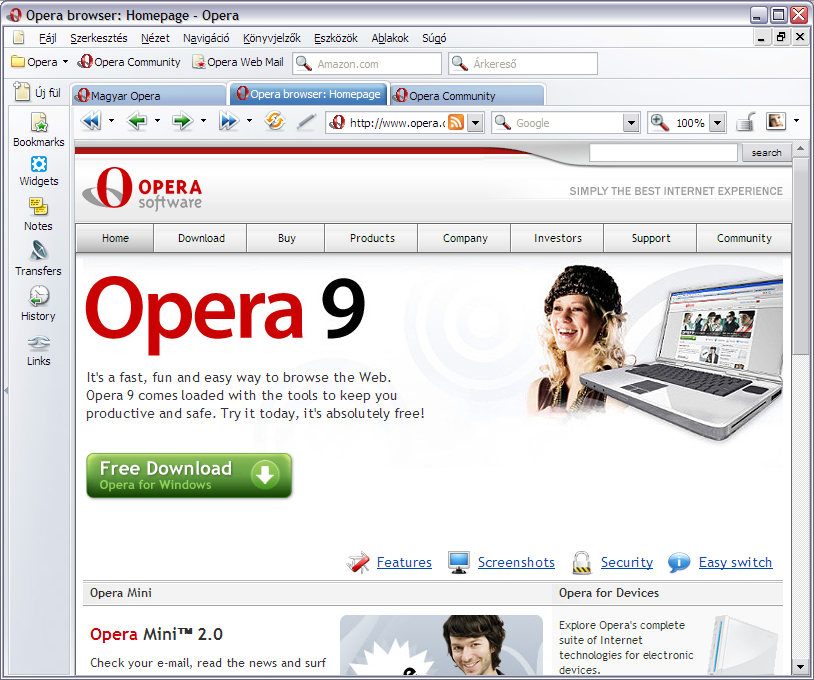
Opera

Lightning fast

Make your web browsing faster. Everything from loading webpages to opening tabs is optimized to happen almost instantly. You can even speed up browsing on slow connections, with Opera Turbo.

Safe and secure

Reduce your exposure to threats on the Web. Your safety is ensured by industry-leading security, Fraud and Malware Protection and an address field that clearly shows your security level.

Powerful features

Use great features that make common browsing tasks faster and easier. Opera has more features built-in than any other browser. You can also add new functionality with extensions.

Mozilla -Firefox (internet browser)

Official Website (download here)

The common thread that runs throughout Mozilla is our belief that, as the most significant social and technological development of our time, the Internet is a public resource that must remain open and accessible to all. With this in mind, our efforts are ultimately driven by our mission of encouraging choice, innovation and opportunity online.
To achieve these goals, we use a highly transparent, extremely collaborative process that brings together thousands of dedicated volunteers around the world with our small staff of employees to coordinate the creation of products like the Firefox web browser. This process is supported by the Mozilla Corporation, which is a wholly-owned subsidiary of the non-profit Mozilla Foundation.
In the end, the Mozilla community, organization and technology is all focused on a single goal: making the Internet better for everyone.

Universal Extractor

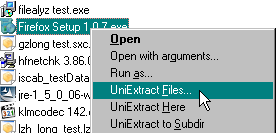
Universal Extractor is a program designed to decompress and extract files from any type of archive or installer, such as ZIP or RAR files, self-extracting EXE files, application installers, etc.  The full list of supported formats can be found in the table below.  It's able to support so many varied file formats by utilizing the many backend utilities listed in the credits at the bottom of the page.
Please note that Universal Extractor is not intended to be a general purpose archiving program.  It cannot (and never will) create archives, and therefore cannot fully replace archivers such as 7-Zip or WinRAR.  What it will do, however, is allow you to extract files from virtually any type of archive, regardless of source, file format, compression method, etc.
The original motivation behind this project was to create an easy, convenient way to extract files from various types of installation packages without the need to remember arcane command line switches or track down separate utilities to handle the unpacking.  Over time, and with the encouragement of its many users and the fine folks over on the MSFN forum, it has evolved into a mature and very capable unarchiving utility that many, including myself, find indispensable.

7-Zip (file archiver with a high compression ratio)


  • High compression ratio in 7z format with LZMA and LZMA2 compression
  • Supported formats:
    • Packing / unpacking: 7z, XZ, BZIP2, GZIP, TAR, ZIP and WIM
    • Unpacking only: ARJ, CAB, CHM, CPIO, CramFS, DEB, DMG, FAT, HFS, ISO, LZH, LZMA, MBR, MSI, NSIS, NTFS, RAR, RPM, SquashFS, UDF, VHD, WIM, XAR and Z.
  • For ZIP and GZIP formats, 7-Zip provides a compression ratio that is 2-10 % better than the ratio provided by PKZip and WinZip
  • Strong AES-256 encryption in 7z and ZIP formats
  • Self-extracting capability for 7z format
  • Integration with Windows Shell
  • Powerful File Manager
  • Powerful command line version
  • Plugin for FAR Manager
  • Localizations for 79 languages

Mozilla Sunbird® (calendar)

Mozilla Sunbird® is a cross-platform calendar application, built upon Mozilla Toolkit. Our goal is to provide you with a full-featured and easy to use calendar application that you can use around the world.

Adobe Reader X (10.0.1)

Adobe Reader X (10.0.1) - pdf file opening... Official website!

Microsoft Office PowerPoint Viewer 2007

Microsoft Office PowerPoint Viewer 2007 lets you view full-featured presentations created in PowerPoint 97 and later versions.


PowerPoint Viewer 2007 lets you view full-featured presentations created in PowerPoint 97 and later versions. This viewer also supports opening password-protected Microsoft PowerPoint presentations. You can view and print presentations, but you cannot edit them in the PowerPoint Viewer 2007.

The following section on Font Components amends the license terms for the PowerPoint Viewer and must accompany any permitted redistribution of the PowerPoint Viewer:

Font Components
You may use the fonts that accompany the PowerPoint Viewer only to display and print content from a device running a Microsoft Windows operating system. Additionally, you may do the following:
  • Embed fonts in content as permitted by the embedding restrictions in the fonts
  • When printing content, temporarily download the fonts to a printer or other output device
You may not copy, install or use the fonts on other devices.


Note: If no end user license agreement is presented during installation or the first run of PowerPoint Viewer 2007, by downloading this software you agree that the software is subject to the terms of the end user license agreement that you already accepted with your previous installation of PowerPoint Viewer 2007, with Microsoft as the licensor.

The following Microsoft PowerPoint features are not supported by this viewer:
  • Information Rights Management (IRM) presentations.
  • Running macros, programs, or opening linked or embedded objects.

AbiWord (text editor)

AbiWord 2.8.6 is an award winning, small, fast, featureful and crossplatform word processor. Get your copy today to experience the state of the art in word processing.

Open office!

Professional office software, which knows everything! Free download and free to use private individuals and businesses.


Inkscape

An Open Source vector graphics editor, with capabilities similar to Illustrator, CorelDraw, or Xara X, using the W3C standard Scalable Vector Graphics (SVG) file format.
Inkscape supports many advanced SVG features (markers, clones, alpha blending, etc.) and great care is taken in designing a streamlined interface. It is very easy to edit nodes, perform complex path operations, trace bitmaps and much more. We also aim to maintain a thriving user and developer community by using open, community-oriented development.


Pencil

Pencil is an animation/drawing software for Mac OS X, Windows, and Linux. It lets you create traditional hand-drawn animation (cartoon) using both bitmap and vector graphics. Pencil is free and open source. 

Gimp

The best freeware 2d drawing apps!


GIMP is a multi-platform photo manipulation tool. GIMP is an acronym for GNU Image Manipulation Program. The GIMP is suitable for a variety of image manipulation tasks, including photo retouching, image composition, and image construction.
GIMP has many capabilities. It can be used as a simple paint program, an expert quality photo retouching program, an online batch processing system, a mass production image renderer, an image format converter, etc.
GIMP is expandable and extensible. It is designed to be augmented with plug-ins and extensions to do just about anything. The advanced scripting interface allows everything from the simplest task to the most complex image manipulation procedures to be easily scripted.
One of The GIMP's strengths is its free availability from many sources for many operating systems. Most GNU/Linux distributions include The GIMP as a standard application. The GIMP is also available for other operating systems such as Microsoft Windows™ or Apple's Mac OS X™ (Darwin). The GIMP is a Free Software application covered by the General Public License [GPL]. The GPL provides users with the freedom to access and alter the source code that makes up computer programs.


Anim8or

Anim8or is a 3D modeling and character animation program that I have written over the past couple of years, not as a commercial endeavor, but because I love 3D graphics, animation, and programming.  While it is far from a complete professional level application like 3DStudio MAX or Lightwave, I believe that it has enough capability to be of use to others.

Blender

Blender is the free open source 3D content creation suite, available for all major operating systems under the GNU General Public License.

Official website (download Blender, forum, support, wiki....)

What is Blender?

Blender was first conceived in December 1993 and born as a usable product in August 1994 as an integrated application that allows the creation of a broad range of 2D and 3D content. Blender provides a broad spectrum of modeling, texturing, lighting, animation and video post-processing functionality in one package. Through its open architecture, Blender provides cross-platform interoperability, extensibility, an incredibly small footprint, and a tightly integrated workflow. Blender is one of the most popular Open Source 3D graphics applications in the world.
Aimed world-wide at media professionals and artists, Blender can be used to create 3D visualizations, stills as well as broadcast and cinema quality videos, while the incorporation of a real-time 3D engine allows for the creation of 3D interactive content for stand-alone playback.
Originally developed by the company « Not a Number » (NaN), Blender continues to be developed as “Free Software”, with the source code available under the GNU GPL license. Development is now conducted under the leadership of the Blender Foundation in the Netherlands.
Key features:
  • Fully integrated creation suite, offering a broad range of essential tools for the creation of 3D content, including modeling, UV-mapping, texturing, rigging, skinning, animation, particle and other simulation, scripting, rendering, compositing, post-production, and game creation.
  • Cross platform, with a uniform OpenGL GUI on all platforms, ready to use for all versions of Windows (98, NT, 2000, XP, Vista, 7), GNU/Linux, OS X, FreeBSD, Irix, SunOS, and numerous other operating systems.
  • High quality 3D architecture enabling fast and efficient creation work-flow.
  • More than 1,000,000 downloads (users) of each release worldwide.
  • User community support by forums for questions, answers, and critique at http://BlenderArtists.org and news services at http://BlenderNation.com.
  • Small executable size, easy distribution.